Haversine Distance Calculator
Calculate the great-circle distance between two coordinates on Earth.


What is a Haversine Distance Calculator?
The Haversine Distance Calculator helps determine the shortest distance over the Earth’s surface between two geographic points based on their latitude and longitude coordinates. This calculation assumes a spherical Earth and uses the Haversine formula—a well-known equation in navigation and mapping applications.
Whether you’re a developer, traveler, GIS analyst, or someone who needs to calculate geographic distances, this tool gives you quick and reliable results.
How Does the Haversine Formula Work?
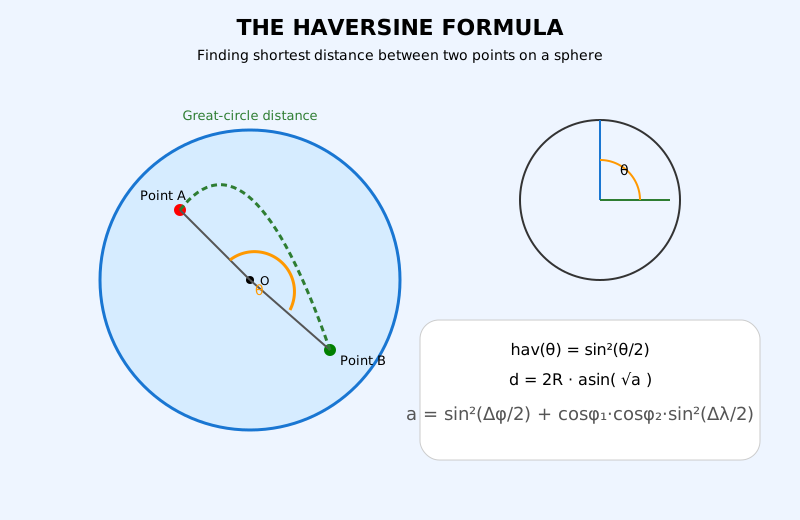
The Haversine formula is based on spherical trigonometry and calculates the great-circle distance between two points on the surface of a sphere, making it perfect for geographical distance calculations.
What is Haversine Distance?
Haversine distance is the shortest distance between two points on a sphere, calculated using latitude and longitude coordinates.
The Haversine Formula:
Variables Explained:
- φ₁, φ₂: Latitudes of point 1 and point 2 (in radians)
- λ₁, λ₂: Longitudes of point 1 and point 2 (in radians)
- Δφ: Difference in latitude (φ₂ − φ₁)
- Δλ: Difference in longitude (λ₂ − λ₁)
- R: Earth’s radius (6,371 km or 3,959 miles)
- d: Distance between the two points
Example of Haversine Distance Calculation
Distance between New York (40.7128, -74.0060) and Los Angeles (34.0522, -118.2437):
Distance: ~3936 km | Distance: ~2445 miles
Step-by-Step Calculation
Point A: New York — lat₁ = 40.7128°, lon₁ = −74.0060°
Point B: Los Angeles — lat₂ = 34.0522°, lon₂ = −118.2437°
- Convert to radians: φ₁ = 0.7101, φ₂ = 0.5942, λ₁ = −1.2920, λ₂ = −2.0643
- Δφ = 0.5942 − 0.7101 = −0.1159 rad
- Δλ = −2.0643 − (−1.2920) = −0.7723 rad
- a = sin²(−0.0580) + cos(0.7101) · cos(0.5942) · sin²(−0.3862)
a = 0.003364 + 0.7648 · 0.8290 · 0.1416 = 0.003364 + 0.08983 = 0.09319 - c = 2 · atan2(√0.09319, √0.90681) = 2 · atan2(0.3053, 0.9523) = 0.6178 rad
- d = 6371 × 0.6178 = 3,936 km (~2,445 miles)
Haversine Distance in Excel
Calculate the great-circle distance between two latitude and longitude points directly in Microsoft Excel using the formula below.
Excel Formula (Kilometers)
=6371*ACOS(
COS(RADIANS(A2))*COS(RADIANS(C2))*
COS(RADIANS(D2)-RADIANS(B2))+
SIN(RADIANS(A2))*SIN(RADIANS(C2))
)
📌 Example Coordinates
| Latitude-1 | Longitude-1 | Latitude-2 | Longitude-2 | Distance in Kilometer | Distance in Mile |
|---|---|---|---|---|---|
| 28.6139 | 77.2090 | 19.0760 | 72.8777 | 1148.09 | 713.39 |
Includes ready-to-use Haversine Excel formula and example data.
Haversine Distance Using CSV File in Python
You can calculate distance for multiple coordinates using a CSV file and export results with kilometers and miles automatically using Python.
👉 Simply download the sample CSV file and Python script below, run the code on your system, and get an output CSV file with calculated distances.
- 📄 The input CSV file contains latitude and longitude values
- 🐍 The Python script reads the CSV and applies the Haversine formula
- 📊 It generates a new CSV file with distance in KM and Miles
📄 Example Input CSV File
Latitude-1,Longitude-1,Latitude-2,Longitude-2
28.6139,77.2090,19.0760,72.8777Python Code (CSV to Distance)
import csv
import math
def haversine(lat1, lon1, lat2, lon2):
    lat1, lon1, lat2, lon2 = map(math.radians, [float(lat1), float(lon1), float(lat2), float(lon2)])
    dlat = lat2 - lat1
    dlon = lon2 - lon1
    a = math.sin(dlat/2)**2 + math.cos(lat1) * math.cos(lat2) * math.sin(dlon/2)**2
    c = 2 * math.atan2(math.sqrt(a), math.sqrt(1 - a))
    R = 6371
    km = R * c
    miles = km * 0.621371
    return round(km,2), round(miles,2)
with open('haversine-input.csv', 'r') as infile, open('output.csv', 'w', newline='') as outfile:
    reader = csv.DictReader(infile)
    fieldnames = reader.fieldnames + ["Distance_KM","Distance_Miles"]
    writer = csv.DictWriter(outfile, fieldnames=fieldnames)
    writer.writeheader()
    for row in reader:
        km, miles = haversine(row["Latitude-1"], row["Longitude-1"], row["Latitude-2"], row["Longitude-2"])
        row["Distance_KM"] = km
        row["Distance_Miles"] = miles
        writer.writerow(row)
print("Output saved as output.csv")FAQ on Haversine Distance Calculator
The Haversine formula is used to calculate the shortest path (great-circle distance) between two points on a sphere, such as Earth. It's ideal for geographic coordinate calculations.
No. Haversine calculates the straight-line distance between two points on the Earth's surface. Driving distance may be longer due to road routes, terrain, and traffic.
For most applications, the Haversine formula provides accurate results within a small margin of error. However, for high-precision needs (e.g., aviation, military), ellipsoidal models like Vincenty's may be preferred.
Did you know
📏 The term "Haversine" comes from "half versed sine", a trigonometric function used in spherical geometry and navigation since the 19th century.
🗺️ The Haversine formula is widely used in GPS devices, geofencing applications, and fitness tracking apps like Strava or Runkeeper.