File transfer estimator
Download Time Calculator
Find out how long a file, game or video will take to download.
Estimated download time
—
Enter your file size and speed, then calculate.
Estimate only. This tool does not measure your internet speed or include installation time.
Compare download speeds
| Connection speed | Estimated time |
|---|


How to use the download time calculator
This free download time calculator estimates the time needed to transfer a file using its size and your internet speed. Use it to plan a large game download, software update, video transfer or cloud backup.
- Enter the file size and select its unit, such as MB, GB or GiB.
- Enter the download speed and choose the matching unit. Internet plans often show Mbps, while download applications may show MB/s.
- Use 100% efficiency for the ideal calculation, or enter a lower percentage to model reduced throughput.
- Select Calculate download time to see the estimate, effective speed and a speed comparison.
For a partially completed download, enter only the remaining file size. For an upload, use your upload speed. If you are transferring several files sequentially at the same sustained speed, enter their combined size.
Download time formula
First convert the file size and connection speed to compatible units. The general calculation is:
Time (seconds) = file size (bytes) × 8 ÷ [speed (bits/second) × efficiency]
Efficiency is a decimal: 100% = 1 and 90% = 0.9. For file size in decimal gigabytes and speed in megabits per second, the shortcut is:
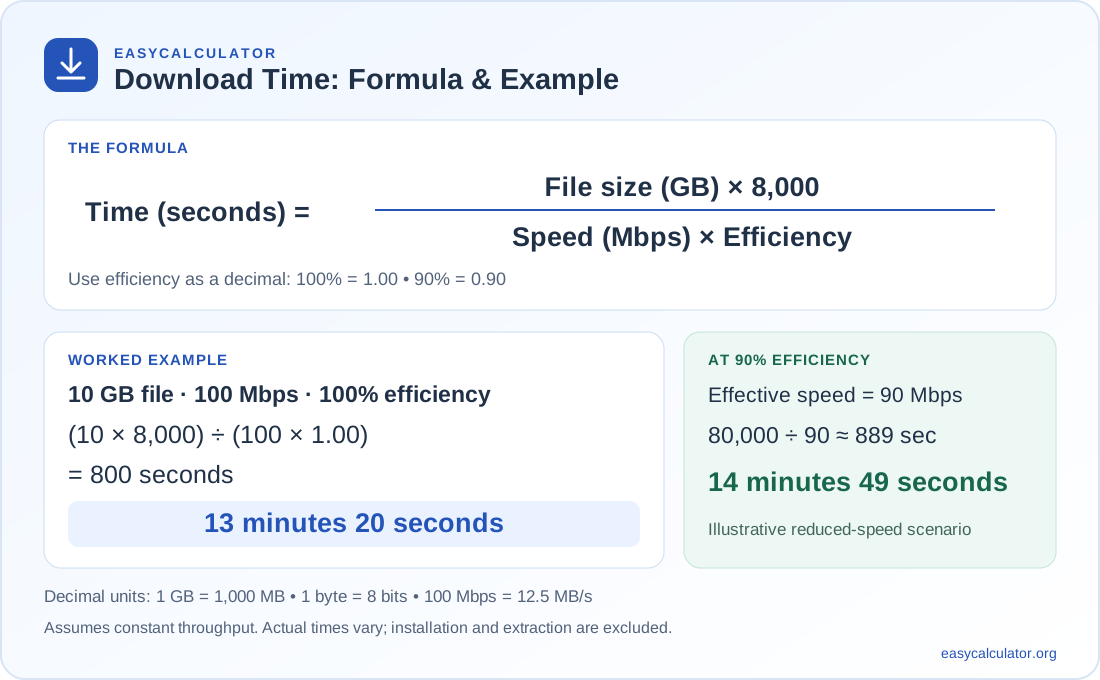
Time (seconds) = file size (GB) × 8,000 ÷ [speed (Mbps) × efficiency]
Example: downloading 10 GB at 100 Mbps
At 100% efficiency, the calculation is 10 × 8,000 ÷ 100 = 800 seconds, or 13 minutes 20 seconds. At 90% efficiency, effective speed becomes 90 Mbps and the time increases to about 14 minutes 49 seconds. This is a scenario estimate, not a prediction of your connection's actual efficiency.
Mbps vs MB/s: why the difference matters
The lowercase b means bits, and the uppercase B means bytes. There are eight bits in one byte. Divide a speed in Mbps by eight to express the same speed in MB/s: 100 Mbps = 12.5 MB/s. A download running at 10 MB/s is transferring data at 80 Mbps.
File sizes also have decimal and binary units. This calculator treats MB as 1,000,000 bytes and GB as 1,000,000,000 bytes. MiB means 1,048,576 bytes and GiB means 1,073,741,824 bytes. These distinctions follow the binary-prefix definitions explained by NIST.
How long does it take to download 1 GB, 10 GB or 100 GB?
The table uses decimal GB, constant speeds and 100% efficiency. Times are rounded to the nearest second.
| Speed | 1 GB | 10 GB | 100 GB |
|---|---|---|---|
| 10 Mbps | 13 min 20 sec | 2 hr 13 min 20 sec | 22 hr 13 min 20 sec |
| 50 Mbps | 2 min 40 sec | 26 min 40 sec | 4 hr 26 min 40 sec |
| 100 Mbps | 1 min 20 sec | 13 min 20 sec | 2 hr 13 min 20 sec |
| 500 Mbps | 16 sec | 2 min 40 sec | 26 min 40 sec |
| 1 Gbps | 8 sec | 1 min 20 sec | 13 min 20 sec |
Why downloads take longer in practice
The equation assumes a steady data rate. Your available throughput can change during a transfer. A Wi-Fi signal may weaken, another device may use bandwidth, or the server may limit the rate it sends data. Transfer overhead and retransmissions can also affect the relationship between a connection's nominal speed and useful file throughput.
A speed-test result is a useful starting point, but it measures a particular route at a particular moment. A different download server may deliver a different rate. For an estimate closer to a running download, enter its observed sustained speed and use 100% efficiency.
Downloading a game is different from installing it
A game's listed storage requirement may include unpacked files and temporary installation space. Enter the download package size when available. The result excludes extracting files, verifying data, applying patches and installing the game.
Ways to investigate a slow download
- Compare the units first: a number shown in MB/s will be eight times smaller than the equivalent number in Mbps.
- Pause other large transfers to see whether shared bandwidth is the bottleneck.
- Try a wired connection or move closer to the router to compare with Wi-Fi.
- Check whether the download application has a bandwidth limit enabled.
- Compare transfers from different sources; upgrading a plan will not remove a remote server's speed limit.
FAQ on Download Time Calculator
Divide the file size in bits by the download speed in bits per second. For decimal units, time in seconds=file size in GB × 8,000 ÷ speed in Mbps. Divide again by the efficiency percentage expressed as a decimal when using an efficiency adjustment.
A 1 GB file takes 80 seconds, or 1 minute 20 seconds, at a constant 100 Mbps with 100% efficiency. At 90% efficiency, the estimate is about 1 minute 29 seconds.
Mbps means megabits per second, while MB/s means megabytes per second. One byte contains eight bits, so 100 Mbps equals 12.5 MB/s before any efficiency adjustment.
Wi-Fi conditions, shared bandwidth, server limits, network congestion and transfer overhead can reduce the speed available to your file. Installation, decompression and verification may add time after the download finishes.
Choose the unit reported by your source. One GB is 1,000,000,000 bytes, while one GiB is 1,073,741,824 bytes. If an application uses GB to mean a binary size, select GiB to match that value.
Yes. Enter the file size and your upload speed instead of your download speed. Upload and download speeds can differ, so use the speed for the direction of your transfer.